CRM vs Excel: Which is better for managing your customer database?
Most businesses in Uzbekistan store customer data in Excel or Google Sheets. This is understandable — Excel is free, familiar, and simple. But as your business grows, Excel's limitations become apparent and it turns into an obstacle for sales growth. In this article, we'll compare CRM and Excel in detail and determine when it's time to switch.
Why most businesses still use Excel
Let's be honest: Excel is convenient. It's on every computer, everyone knows how to use it, and there's no extra cost. When you have 20-30 customers, Excel works fine. But problems start with growth. At 200+ customers, searching gets difficult. At 500+, the file slows down, data gets mixed up, and tracking team activity becomes impossible. Research shows that over 71% of businesses still rely on manual spreadsheet management.
7 risks of managing customers in Excel
- Data errors — 88-90% of all Excel spreadsheets contain errors. A simple copy-paste mistake can mean losing a customer
- Version confusion — 'Customers_base_new_final_2.xlsx' sound familiar? Nobody knows which version is current
- No automation — Excel doesn't remind you about calls and meetings. Salespeople spend 2-3 hours daily on data entry instead of selling
- Security issues — files can be copied, deleted, or taken by departing employees along with your entire customer base
- Difficult collaboration — two people working in the same file simultaneously leads to data overwriting
- Complex reporting — answering simple sales questions requires formulas and pivot tables
- Limited scalability — as data grows, files slow down, and mobile access is nearly impossible
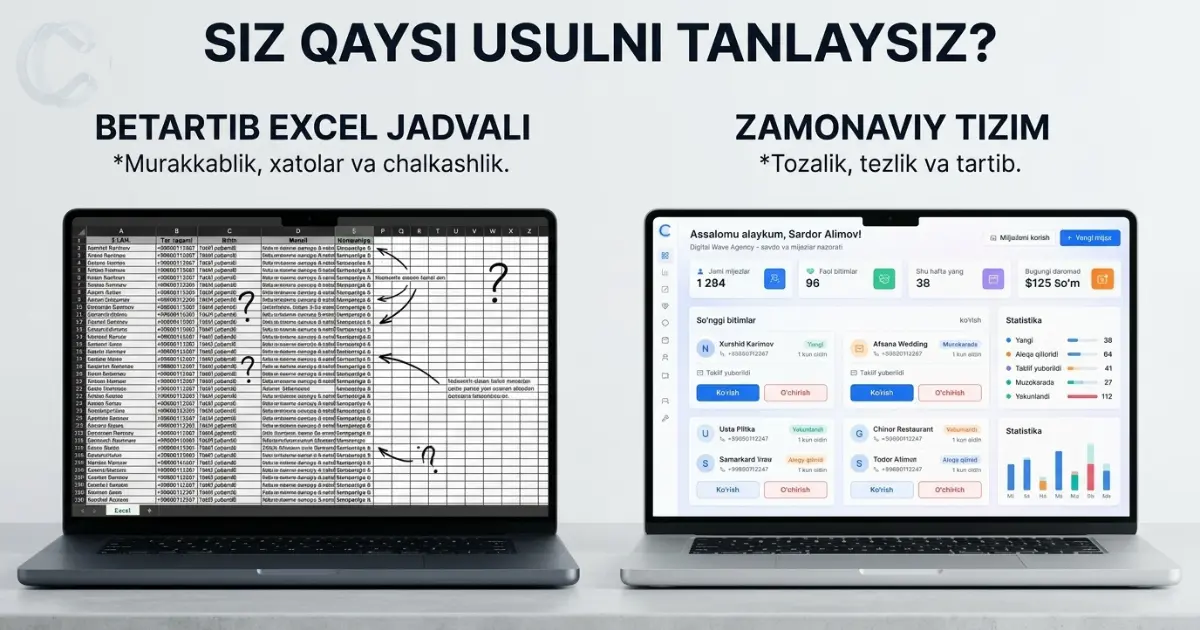
Detailed comparison: CRM vs Excel
- Price — Excel is free, CRM requires subscription. But CRM ROI is 871%
- Data accuracy — Excel has errors in 88-90% of cases, CRM has validation and verification
- Teamwork — Excel locks files for one user, CRM lets everyone work simultaneously
- Automation — everything is manual in Excel, CRM automates reminders, notifications, tasks
- Security — Excel has minimal protection, CRM has roles, access rights, JWT authentication
- Reports — Excel needs formulas, CRM provides a ready dashboard with one click
- Mobile access — limited in Excel, full responsive interface in CRM
- Integrations — Excel doesn't integrate, CRM works with Telegram, payment systems
Companies that switched from Excel to CRM reduced sales process errors by 73% and increased each salesperson's productivity by an average of 34%.
— Salesforce Research
When to switch from Excel to CRM — 5 clear signs
- You have 50+ customers — managing them in Excel is getting complicated
- Your team has 3+ salespeople — it's unclear who's working with which customer
- You regularly forget to follow up — customers are waiting and going to competitors
- You spend 2+ hours daily on data entry — this time should go toward actual sales
- You don't know exact sales results — no answer to 'how much did we sell this month'
How to switch from Excel to CRM painlessly — 5 steps
- Clean your Excel file — remove duplicates, organize column names, delete empty rows
- Register in CRM — Cliento CRM registration takes 2 minutes, try demo mode for free
- Import your data — Cliento supports Excel (.xlsx, .xls) and CSV. AI automatically matches columns to CRM fields
- Train your team — a 30-minute walkthrough is enough. Interface available in Uzbek, Russian, and English
- Transition gradually — work in both for 2 weeks, then fully switch to CRM
Real cost and benefits of switching to CRM
Many see CRM adoption as an expense. It's actually an investment with fast returns: each employee saves 5-10 hours weekly, forgotten follow-ups drop to near zero, and sales grow by an average of 29%. Average ROI is 871%. Most companies recoup their investment within 2-4 weeks.
Conclusion
Excel is a good tool — but it wasn't designed for CRM. If your business is growing and you want to manage customers professionally, switching to CRM is inevitable. This isn't an expense — it's an investment with a proven 871% return.
Cliento CRM automatically imports your Excel files with AI assistance, works in 3 languages, and is built specifically for Uzbekistan business. Try it free at crmcha.uz — get started in just 2 minutes.
Also read
What is CRM? A complete guide to customer relationship management for your business
What is a CRM system, how does it work, what benefits does it bring to business, and how to choose the right CRM for small businesses in Uzbekistan — explained in simple terms.
What is CRM and how does it help your business?
A detailed explanation of what a CRM system is, its core functions, and how it benefits small businesses.
7 tips to stop losing clients
A collection of practical tips for retaining clients and building long-term relationships with them.